
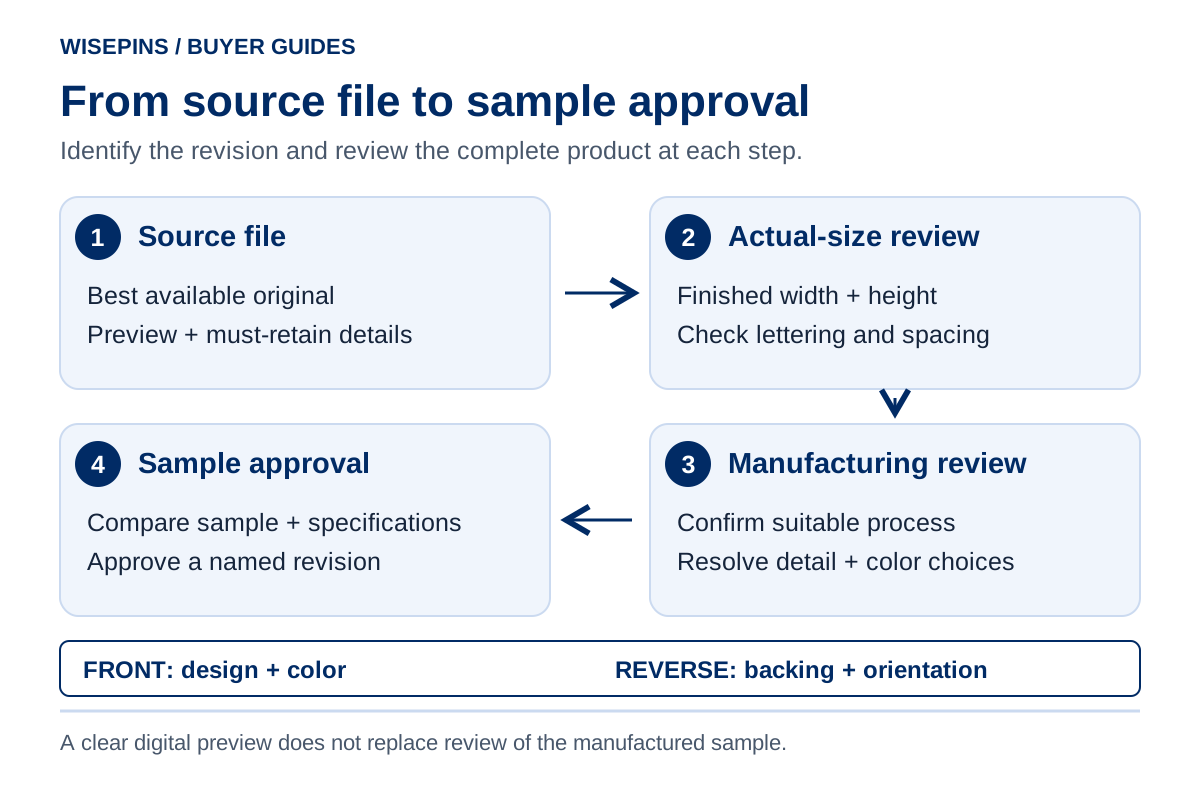
Prepare custom pin artwork by sending your best source file, the intended finished dimensions, and a short explanation of what must stay unchanged. Then review text, gaps, colors, the outer shape and reverse-side requirements at the actual product size. A large, sharp screen preview does not prove that the same details will work on a small physical badge.
You can start with a logo, photograph, sketch or idea. You do not need a finished production drawing before contacting WisePins. This guide helps you organize what you already have and identify the decisions to resolve with your manufacturer before approving a sample.
1. Choose files that explain the design
Send an editable source when available, accompanied by a preview showing the intended appearance. WisePins recommends AI, PDF, SVG, EPS or high-resolution PNG files as starting formats. The contents matter as much as the extension.
| What you have | Useful submission | What to check or explain |
|---|---|---|
| Vector logo or illustration | Original AI, SVG, EPS or vector-containing PDF, plus a preview | Identify the correct design and remove unrelated alternatives from the approval view. |
| Raster artwork or photograph | Original high-resolution PNG; explain the intended printed appearance | State finished dimensions. Avoid a screenshot when the original is available. |
| PDF of uncertain origin | PDF plus the original design file, if available | A PDF may contain vector shapes, pixels or both; ask whether any elements need rebuilding. |
| Sketch or reference photo | Clear image plus notes identifying the features you want | Separate the desired shape, layout and finish from incidental details in the reference. |
| Several designs | One clearly identified artwork set per design | Match each design to its own dimensions and quantity. |
Vector paths remain sharp when scaled, while raster images depend on their pixels. Saving a small image inside an AI or PDF document does not restore missing detail. Adobe explains the distinction between raster and vector artwork.
A reference photo can communicate direction, but do not expect the manufacturer to infer exact lettering, hidden edges or colors obscured by reflections. Include the original logo and typed wording whenever you have them.
What does “high-resolution PNG” mean at pin size?
Judge pixel dimensions together with the size of the artwork as it will be printed. Effective resolution in pixels per inch (ppi) = artwork width in pixels ÷ (printed artwork width in mm ÷ 25.4). Use the pixels in the actual design area; transparent padding around a small logo does not add detail to that logo.
For an original image area 600 pixels wide, printing that area at 25.4 mm wide gives 600 ÷ 1 = 600 ppi. The same 600 pixels across 50.8 mm gives 600 ÷ 2 = 300 ppi. These figures explain scale, not WisePins' minimum resolution or a guarantee of print quality. Check height as well if the artwork has been stretched or cropped.
Adobe's image-size documentation distinguishes pixel dimensions, physical size, resolution and resampling. Changing a resolution label without adding pixels does not supply more original detail. Send the original image, state its intended printed size and flag blurred lettering or rough edges for review. For enamel production, a sharp PNG is still a reference to translate into the chosen metal and color construction.
2. Define finished size before judging detail
Specify width × height in millimeters, with the pin shown upright. State whether those dimensions describe the metal outline or another component. For an irregular shape, a note such as “30 mm wide, height proportional” is clearer than “30 mm pin.”
If the size is undecided, explain the wearing position and essential information. Ask for alternative dimensions with the same design, then compare actual-size printouts.
Worked example: what happens when artwork shrinks?
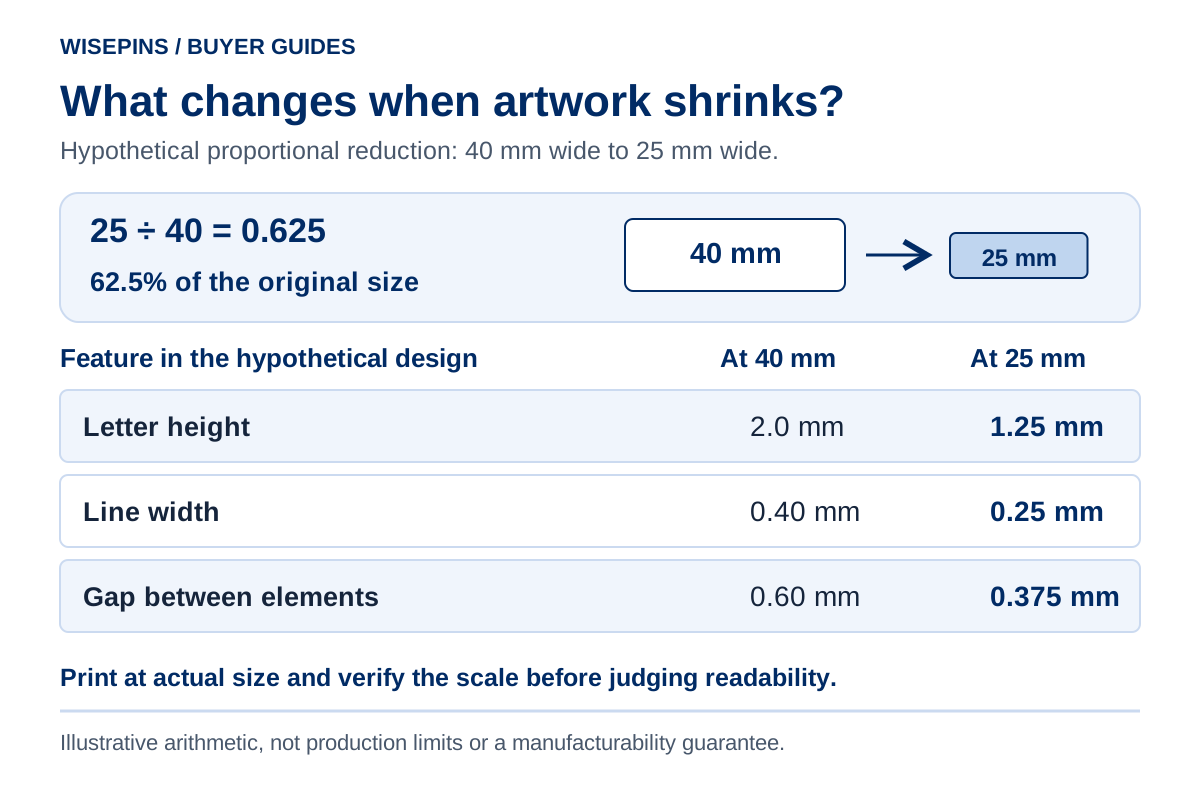
Assume a design is 40 mm wide and is reduced proportionally to 25 mm:
Scale factor = 25 ÷ 40 = 0.625, or 62.5%.
| Element in the hypothetical 40 mm design | After proportional reduction to 25 mm |
|---|---|
| Letter height: 2.0 mm | 1.25 mm |
| Line width: 0.40 mm | 0.25 mm |
| Gap between two elements: 0.60 mm | 0.375 mm |
These are arithmetic examples, not minimum production specifications or a claim that those features are manufacturable. Actual feasibility depends on the design, material and chosen process.
The useful lesson is that text, strokes and spaces shrink together. A design can remain perfectly sharp as vector artwork while becoming difficult to read or unsuitable for the selected manufacturing method.
Print the alternatives at actual size, with automatic page fitting disabled. Include a dimensioned reference line and measure it to confirm the print scale. Check the design at its intended viewing distance. Use an enlarged view to investigate problems, then return to actual size before deciding.
3. Mark details that need a manufacturing decision
Separate brand essentials from adjustable detail. For example: “Keep the club name, shield proportions and central symbol; the decorative border may be simplified.” This gives the manufacturer a basis for proposing changes without redesigning the identity.
| Artwork issue | Decision to discuss | What the buyer should compare |
|---|---|---|
| Fine lettering | Enlarge the design, increase lettering space or revise the type treatment | Exact wording and readability at finished size |
| Narrow gaps or tiny color regions | Simplify, merge or reposition details | Whether the recognizable feature survives the change |
| Gradient, shadow or photographic image | Compare a printed interpretation with a simplified solid-color version | Which visual information is essential and how the surface should look |
| Detailed monochrome crest | Compare metal relief with a printed interpretation | Whether depth or reproduction of the original drawing matters more |
| Very narrow projections or internal cutouts | Review the outer shape and proposed construction | How much the outline changes and whether the result suits the intended use |
In conventional enamel construction, metal boundaries define separate color-filled areas. A continuous gradient therefore needs a different interpretation from ordinary solid enamel fills. For context, Signature Pins describes raised metal boundaries and recessed enamel, while EnamelPins.com discusses printed gradients and shadows.
For your project, compare custom enamel pins, custom printed pins and die struck pins against the actual artwork. Changing the process also changes the product's visual character; it is not simply a file conversion.
Do not apply a minimum line width copied from another supplier as an approval rule. Ask the manufacturer to identify the exact features needing adjustment in your proposed size and process.
Check lettering by its strokes, openings and spacing
Font size alone is an incomplete specification: two typefaces at the same nominal point size can have different letter shapes. Inspect the actual outlines at the proposed finished size, and mark three places on the drawing:
- Thinnest stroke: identify a fine stem, serif or decorative line that must remain visible. Ask whether it needs thickening for the proposed process.
- Smallest internal opening: check the enclosed spaces in letters such as A, B and R. Ask whether these remain distinct in the proposed construction.
- Closest spacing: check where letters approach each other, a border or another symbol. Identify any pair that becomes hard to distinguish at actual size.
If a word reads only when magnified, request a specific alternative: more space around it, a simpler letterform, a larger overall size or less secondary wording. Have someone unfamiliar with the artwork read the revised actual-size version without prompting, then confirm the same locations on the physical sample. An office printout helps screen the layout; it does not establish a manufacturing tolerance.
4. Label colors and finishes separately
Prepare a simple color key: which parts are color-filled or printed, which are exposed metal, and which are intentionally left without artwork. A black line in a proof might represent metal, black color or a drawing annotation; label it rather than relying on appearance.
For brand colors, provide your existing Pantone references or brand guide where available. Identify the reference system and suffix shown in that guide. If you only have RGB, HEX or CMYK values, send them and ask how the production reference will be agreed. Avoid converting them repeatedly between applications yourself.
Digital color values require an output context. Adobe's color-management guidance explains how output profiles and conditions affect conversion. A screen preview or office printout should therefore communicate intent, with the physical color and surface assessed through the agreed sample route.
List the metal finish separately from the graphic colors. “Gold finish” describes a requested appearance; it is not an enamel color code. Where a color is especially important, mark its location and priority before sampling. Do not assume any color reference guarantees an identical appearance across metal, enamel, print and packaging.
5. Include the reverse side and packaging relationship
The front artwork does not describe the entire product. Add a separate reverse-side view or written brief covering:
- Upright orientation and how the front relates to the reverse view.
- Preferred backing type, if known, and intended wearing position.
- Any proposed back text or logo, with exact spelling and orientation.
- Packaging preferences, including the intended position on a backing card.
Ask the manufacturer to review backing placement with the actual shape and size. If you are preparing a card, confirm the attachment arrangement before finalizing its holes or slots. A paper layout alone cannot establish how the complete pin, backing and card will behave together.
For button badges, request the template for the chosen shape and construction before creating final artwork. Distinguish the visible face from artwork that wraps around the edge. Keep essential lettering within the manufacturer's specified visible area; do not invent a universal bleed or safe margin for every badge.
6. Send one organized artwork brief
Keep an editable master for future revisions. For handoff, also prepare a reference copy with text converted to outlines when appropriate, then inspect the result. Outlining preserves letter shapes but removes normal text editing, as reflected in Adobe's export guidance.
Check linked images before sending. Embed them or include the necessary assets in an organized package; Adobe documents this workflow in its Illustrator packaging guide. Do not distribute font files without checking their license.
Use a consistent identifier, such as Club-Crest_30mm_Rev03, across the source, preview and written brief. Avoid filenames such as final-new-final2. If there are alternatives, label them A and B, and state which one is being evaluated.
Copyable artwork submission brief
Use the fields you already know. Leave an undecided item as “please advise”; this is a working brief, not a condition for making an initial inquiry.
Project / design ID:
Artwork revision and filenames:
Intended use and wearing position:
Finished width × height, units and upright orientation:
Quantity per design:
Preferred product/process, or please advise:
Must retain: exact wording, symbols and brand proportions:
May adjust: decorative details, layout or size:
Color references and areas they apply to:
Requested metal finish:
Reverse-side text/logo and orientation:
Backing preference, or please advise:
Packaging / backing-card requirements:
Target in-hand date and destination:
Questions for review: readability, small gaps, gradients, shape:
Person responsible for artwork approval:
The brief should let someone distinguish a design requirement from a preference. “Please retain the full school name; suggest a larger size if needed” is more actionable than “make it look good.”
7. Approve a specific version and check the sample
Before approval, compare the proposed production artwork against the original brief. Record any accepted changes to lettering, spacing, color boundaries, shape or reverse-side details.
| Approval check | What to record |
|---|---|
| Identity and wording | Correct design ID, logo version, spelling and punctuation |
| Dimensions | Width, height, units and orientation |
| Artwork changes | Which details were changed and which version includes them |
| Colors and finish | Named references, locations and requested surface appearance |
| Reverse and attachment | Back text, orientation, backing type and proposed position |
| Packaging | Card artwork version and agreed product placement, where applicable |
| Approval scope | Whether you are approving a layout for sampling or a sample and specification for bulk production |
A digital drawing can confirm layout. It cannot fully demonstrate physical texture, reflectivity, attachment feel or the appearance of the complete packaged item. Use the sample development stage to evaluate those features.
At WisePins, customers check the sample and confirm specifications before bulk production. If the artwork changes after sampling, identify what changed and agree which checks need repeating. A new revision should not inherit approval merely because most of the drawing looks familiar.
8. Four points to carry into your project
- Send the best source you have and explain missing information.
- Compare artwork at finished dimensions, with the print scale verified.
- Identify essential details before discussing simplification or another process.
- Approve a named revision and distinguish artwork approval from sample approval.
9. Custom pin artwork FAQ
Yes. WisePins can begin a discussion from an idea, photo, logo or sketch and help establish the product direction. Explain the important features and provide exact wording separately. The final artwork, specifications and applicable development costs still need to be agreed.
No. The extension does not establish what is inside the document. Send the source file if available, along with a preview and finished dimensions. Ask whether unclear or small elements require reconstruction or adjustment for the chosen process.
Judge the smallest stroke, the openings inside letters and the spacing between letters at the intended finished size. Mark unclear areas and request a specific revision before sampling. The usable lettering depends on the letterform, surrounding artwork and chosen process, so a font-size number alone cannot approve it. Confirm that the exact wording remains readable on the physical sample.
Provide the original image and identify what must remain. A printed approach may suit continuous tones; a solid-color reinterpretation changes the design. Ask to compare the appropriate options for your project, including the resulting surface appearance and sample requirements.
Do not make an unrequested conversion just to satisfy a generic checklist. Provide the original file and available color references. Agree the intended process and production color basis with the manufacturer, retaining the original master for comparison.
10. Discuss the artwork you already have
Send your current artwork or reference, intended use and any dimensions or quantity you know through WisePins' contact page. Mark the details you need to preserve and the points you would like help resolving. We can discuss the suitable product direction and specifications before moving into sample development.
Discuss Your Project